


Meme Soundboard 2026: Sound FX
3.522.00 Reviews
App Specs
- Version
- 25
- Updated On
- License
- Free
- Downloads
- 100,000+
- Developer
- MemeSounds Mobi
- Categories
- Music & Audio
- Platform
- Android
Screenshots
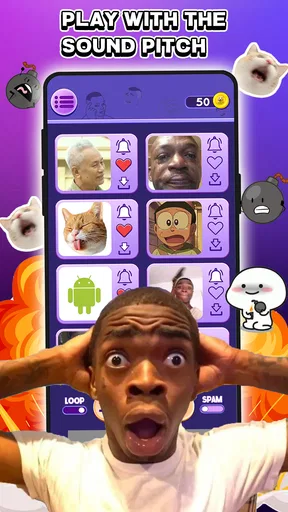
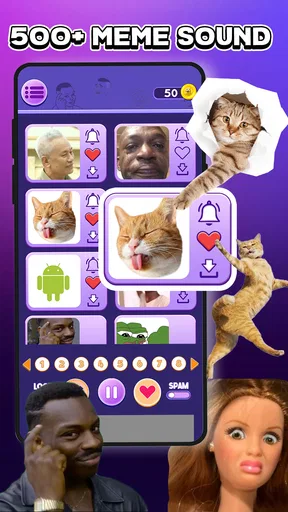
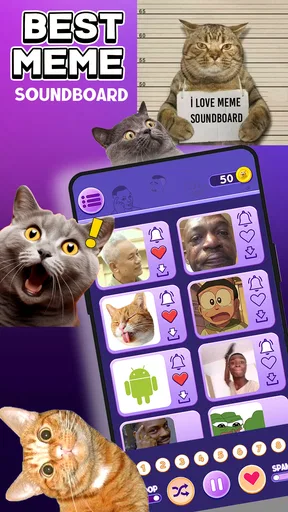
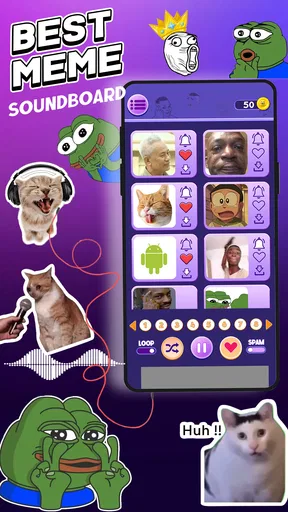
 Analysis by AppCompare
If you’re trying a meme soundboard for the first time, I’d keep your expectations simple: it’s a quick way to bring short audio reactions into chats and casual moments, not a full music player or an editing studio. Meme Soundboard 2026: Sound FX is a free Android app from MemeSounds Mobi, listed for Everyone and available on devices running Android 7.0 or later. It has an average rating of 3.5 from around 619 ratings, so I’d treat it as a fun, practical novelty rather than a polished essential.
What to expect from a soundboard
The appeal is immediacy. Instead of searching for a clip in a video or trying to spell out a reaction, you open the app and play a sound. That works best when the moment is already light-hearted: a friend makes an overconfident prediction, a game session gets dramatic, or a group chat needs a playful punctuation mark. The app’s stated focus is meme effects, with an option to use sounds as ringtones or SMS tones, giving it a use beyond one-off jokes.
I would not approach it as a dependable source for every viral audio clip or as a place to build a carefully organized sound library. Meme tastes change quickly, and a soundboard is most useful when the clips it offers suit your own sense of humor. Before relying on a particular sound for a call or message alert, try it out and make sure it is short and recognizable enough for that purpose.
Getting set up without overthinking it
The first useful step is simply to open the app and listen before changing any phone settings. That helps you work out whether its style of sounds fits the people you intend to share them with. If you find a clip you genuinely like, then consider setting it as a ringtone or SMS tone; doing this selectively is more practical than turning every joke into an alert you will hear all day.
The app is free to install, though it offers in-app purchases priced from $2.99 to $49.99 per item. I’d explore the basic experience before spending anything and pay attention to any purchase prompt so you know what you are choosing. The current version is 25, and the app has over 100,000 installs, which gives a newcomer a sense of its reach without guaranteeing that every sound or interaction will suit them.
Your first satisfying use
A low-pressure first test is to play one sound while you are alone, then decide whether it works at the volume and length you would want in a conversation. If it makes you smile, send or play it for a friend who already enjoys meme humor. That small test is better than surprising a whole group with a loud effect before you know how it comes across.
For a realistic everyday use, imagine a friend sending a dry message after a minor mishap. A quick comic sting can add tone that plain text misses, but timing matters: the same clip may feel funny between close friends and awkward in a work chat. I’d keep it to people who welcome that style of banter, and use ordinary text when the situation is serious or someone might not hear the sound.
Worth Reading Before You Choose

Flipboard Shows What News Apps Must Do Beyond the Feed

Switching to Android Auto Means Rethinking Your Driving Routine

Google Calendar Makes a Crowded Week Easier to Manage

Ludo King Makes the Most of the Minutes Between Plans

Baby Panda World Brings Quick Play to Modern Phones, but Its Game Library Feels Busy

ESPN’s Live Game View Makes Following Close Games Easier
Where the fun can meet friction
A soundboard is different from a streaming music app, a messaging app’s built-in stickers, or a folder of audio files. Streaming services are better for listening to full tracks; stickers and reaction buttons are less disruptive when you want a quiet response; saved audio files can be more suitable when you need precise control over a clip. This app makes most sense when you want a quick sound effect and do not want to turn the moment into a larger editing task.
There is also a social trade-off: a sound that feels amusing once can become irritating if it is repeated or assigned to an alert you hear constantly. I’d use a distinctive tone for a specific contact only if I was sure I would still enjoy it after the novelty fades. And in shared spaces, check the setting before playing audio aloud; a clever effect is not worth interrupting a meeting, a quiet commute, or someone else’s call.
What’s the Buzz About?
So, what exactly is Meme Soundboard 2026: Sound FX? Imagine having access to a massive library of the most iconic sounds from the internet, all ready at your fingertips. From classic memes to the latest viral sensations, this app has got it all. It’s like carrying a piece of the internet in your pocket. Whether you’re looking to spice up a group chat, play a prank, or just amuse yourself, this app delivers endless entertainment.
Features That Make It Stand Out
First off, the app’s user interface is super intuitive. You don’t need a manual to figure it out. It’s designed to be straightforward, so you can jump right in and start having fun. The home screen displays a grid of sounds, and you can easily search for specific ones using the search bar.
One of the coolest features is the ability to create your own custom soundboards. You can mix and match your favorite sounds, making it perfect for personalized pranks or themed gatherings. There’s also a trending section that keeps you updated with the latest and greatest sounds. It’s like having a pulse on internet culture.
Another feature worth mentioning is the shareability. You can easily send sounds to your friends via social media or messaging apps. It’s seamless and adds that extra layer of fun to your conversations. Plus, the app supports offline access, so you can use your favorite sounds even when you’re out of signal range.
Turning discovery into a useful routine
If you plan to use it more than once, I’d make a small personal shortlist rather than browsing every time someone asks for a sound. Try a few clips in different contexts: one as a playful reaction, another as a possible alert, and perhaps one you would keep for a particular group of friends. The point is not to use every option, but to find a handful that still feels funny after several listens.
That approach also helps answer a common question: is this mainly for sharing, or can it change how the phone sounds? The app is positioned for both quick sound use and setting a clip as a ringtone or SMS tone. I’d treat those as separate jobs. For a chat, a brief effect can be a spontaneous joke; for an alert, clarity and restraint matter more than novelty. A sound that is amusing through the app may be too distracting as a repeated notification.
User Experience and Performance
Now, let’s talk about how it performs. I’ve been using it for a week, and so far, it’s been smooth sailing. The app is lightweight, so it doesn’t hog your phone’s resources. I haven’t experienced any lag or crashes, which is always a plus in my book.
The sound quality is top-notch. Each clip is clear and crisp, ensuring that you get the full effect of each sound. Whether it’s a dramatic "dun dun duuun" or a hilarious laughter track, you’re getting the best audio experience possible.
Small habits that prevent awkward moments
For sharing, I’d test the route that feels natural on your phone before the perfect joke arrives. Play a clip first, then see whether sharing it through your usual messaging app fits your conversation; if it does not, simply playing it at the right moment may be easier. I would not assume that a sound will land the same way in every group, since humor depends on context and on whether people can actually hear it.
Another useful check is the phone’s sound level. A short effect played at full volume can be much louder than expected, especially when you are switching from headphones to the phone speaker. I’d begin quietly, raise the volume only if needed, and avoid playing clips near people who are working or resting. These small choices make a novelty app easier to enjoy without making it everyone else’s problem.
Who will get the most from it
I’d recommend it to someone who likes sending playful reactions, enjoys testing meme audio with friends, or wants an occasional custom alert. It is especially suited to casual use, where a sound can add a little personality without needing to be perfectly curated. The app is rated for Everyone, but that does not mean every joke will suit every conversation; I’d still use judgment about the audience.
If you want a deep audio editor, a reliable archive of specific clips, or a quiet way to react in every setting, I’d choose a different tool. A messaging app’s standard reactions are often better for low-key exchanges, while a music service is the obvious choice for songs and longer listening. The soundboard is at its best in the narrow middle: quick, recognizable effects for people who enjoy that kind of humor.
Why You’ll Love It
If you’re someone who loves memes, enjoys making people laugh, or just wants to add a bit of flair to your interactions, this app is a must-have. It’s not just about playing sounds; it’s about creating moments and memories. I’ve used it at parties, during online gaming sessions, and even in office meetings (when the mood was right, of course). It’s versatile, and it’s fun.
Plus, the app is regularly updated with new sounds, so there’s always something fresh to discover. It’s like a never-ending treasure trove of entertainment. And let’s be honest, who doesn’t love a good meme?
Making it work beyond the first laugh
For a small gathering, I’d pick a few sounds beforehand rather than browsing while everyone waits. That keeps the joke moving and helps you avoid playing several clips just to find one that fits. During online gaming, it can work as a quick reaction between rounds, but I would be cautious if it overlaps with voice chat or distracts someone who is concentrating. A soundboard adds atmosphere only when it does not compete with the conversation.
The same principle applies to office use: keep it to a relaxed setting where colleagues already share that humor, and skip it in formal meetings. A funny effect can break tension among friends, but it can also make a serious exchange seem dismissive. I find that the best use is intentional and occasional, not constant background noise.
Final Thoughts
In a world where communication is often limited to text, Meme Soundboard 2026: Sound FX brings a new dimension to the table. It’s not just an app; it’s an experience. Whether you’re a meme enthusiast or just someone looking to spice up your day-to-day interactions, this app is for you.
So, go ahead and give it a try. You might just find yourself becoming the life of the party with your newfound collection of iconic sounds. Download it today, and let the good times roll!
My practical advice is to start with a couple of sounds, try them in a friendly one-to-one chat, and only then decide whether any deserve a permanent place as an alert. That gives you a quick sense of the app’s humor and usefulness without turning setup into a project. If you find yourself opening it often, keep the clips that genuinely fit your circles; if you rarely reach for it, there is no need to force a routine around it.
Pros
- Extensive library of popular meme sounds.
- User-friendly interface with easy navigation.
- Regular updates with new sound additions.
- Option to create custom sound playlists.
- High-quality audio for clear playback.
Cons
- Contains ads that may interrupt usage.
- Some sounds require in-app purchases.
- Limited customization for sound effects.
- No offline mode for sound access.
- May drain battery with prolonged use.
FAQs for Meme Soundboard 2026: Sound FX
What features does Meme Soundboard 2026: Sound FX offer?
Meme Soundboard 2026: Sound FX includes a vast library of popular and trending meme sounds, sound effects, and customizable options. Users can easily browse through categories, save favorites, and even upload their own sounds. The app also allows for easy sharing across social media platforms, making it a must-have for meme enthusiasts.
Is Meme Soundboard 2026: Sound FX free to use?
Yes, Meme Soundboard 2026: Sound FX is free to download and use. However, there are in-app purchases available, such as premium sound packs and ad removal options. This allows users to enhance their experience if they choose, but the core features remain accessible without any cost.
Does Meme Soundboard 2026: Sound FX require an internet connection?
Meme Soundboard 2026: Sound FX can be used offline for playing and organizing downloaded sounds. However, an internet connection is needed to access new sound packs, updates, and to share sounds directly on social media. This ensures you always have the latest content and features at your fingertips.
Is Meme Soundboard 2026: Sound FX available on both Android and iOS?
Yes, Meme Soundboard 2026: Sound FX is available for both Android and iOS platforms. It is designed to provide a seamless experience across different devices, ensuring that users can enjoy their favorite meme sounds regardless of their operating system. Download links are provided on the official website.
How user-friendly is Meme Soundboard 2026: Sound FX for new users?
Meme Soundboard 2026: Sound FX is designed with an intuitive interface, making it easy for new users to navigate. The app features a simple layout, clear instructions, and helpful tutorials. Even those new to soundboards will find it straightforward to explore and utilize the app’s full potential.


